Premium
The Premium screener ranks every cross-exchange spread that matters — by side, by direction, by venue, with hard filters for what you can actually execute.
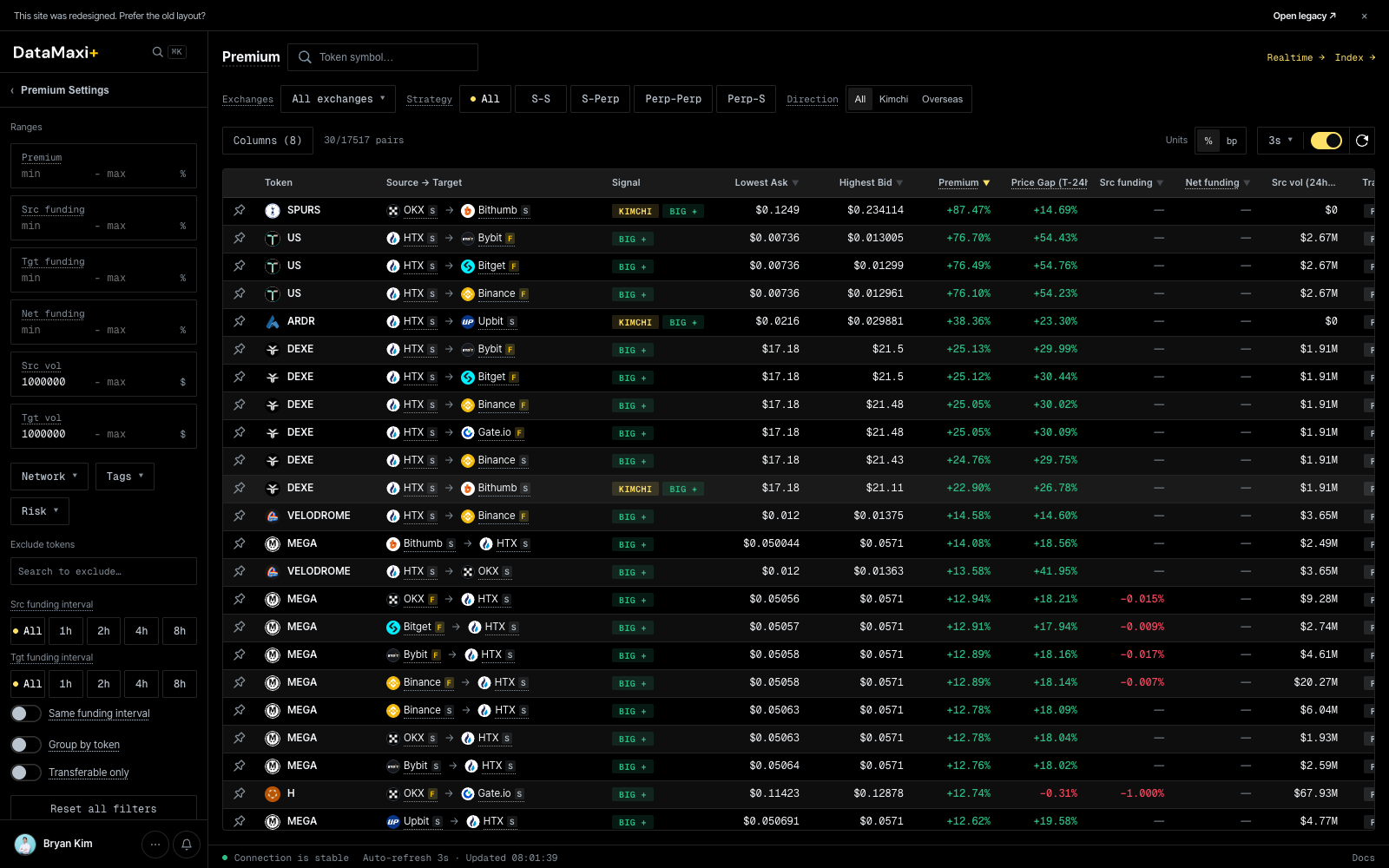
Header controls
Top of the screen:
- Token symbol search — filter the table to a specific base asset.
- Exchanges · All exchanges ▼ — multi-select venue filter.
- Strategy pills —
All · S-S · S-Perp · Perp-Perp · Perp-S. Picks which legs are eligible (spot-spot, spot-perp, etc.). - Direction pills —
All · Kimchi · Overseas. Filters to KRW-market premium (Kimchi) or non-Korean cross-venue spreads. - Units toggle —
% / bp(basis points). - Refresh interval — default 3s; toggle on/off.
Premium Settings (left rail)
The collapsible left rail holds all the filters you want to set once and forget:
- Ranges —
Premium,Src funding,Tgt funding,Net funding,Src vol,Tgt vol. Each takes amin — maxpair so the table only surfaces spreads big enough to trade. - Network ▼ · Tags ▼ · Risk ▼ — chain, token-tag, and risk-class filters.
- Exclude tokens — search-style add list for permanent blocklists.
- Src / Tgt funding interval — pin the funding cycle on both legs (
All / 1h / 2h / 4h / 8h). - Toggles: Same funding interval (only pairs whose source and target settle on the same cycle), Group by token, Transferable only (exclude pairs where the asset can't be deposited or withdrawn on one of the venues).
- Reset all filters at the bottom.
Main table
Columns (8) is configurable. Default columns include the source venue, target venue, the premium % (or bps), the funding rates on both legs, and 24h volume on both legs. The pair count (x/y pairs) above the table reflects how many pairs survive your current filters.
Inspector
Clicking any row opens a slide-out inspector on the right side of the screen — everything you need to commit to (or pass on) the spread without leaving the page.

The panel itself, zoomed in:
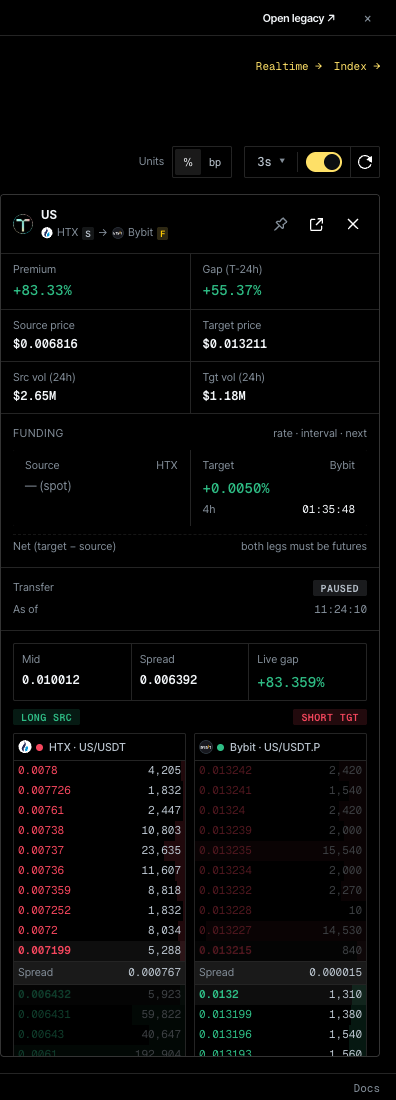
Panel header
- Token + leg pair — e.g.
SPURS · OKX s → Bithumb sshows the asset and the spot/perp annotation on each leg. - Pin — keep this token's inspector pinned so it stays selected as you re-filter the table.
- Open in new view (
↗) and close (✕). - Top-right jumps:
Realtime →(the Realtime Premium matrix for this token) andIndex →(the Premium Index history).
Stats grid
| Block | Reads |
|---|---|
| Premium % | live premium of the pair |
| Gap (T − 24h) | how much the premium has changed vs. 24h ago |
| Source price / Target price | last price on each leg |
| Src vol (24h) / Tgt vol (24h) | 24h volume on each leg — quick liquidity check |
Funding block
rate · interval · next columns for the source and target legs. Net (target − source) lights up only when both legs are futures — the carry edge the inspector flags is the one you can actually collect.
Transfer block
PAUSED / OPEN chip plus the last-checked timestamp. If transfer is paused on either side, the spread isn't tradeable as a transfer-arb — the inspector marks it explicitly.
Telegram posts
A filter row (All / Korea / Global) followed by a feed of recent Telegram messages that mention this token. Useful for catching narrative context — is there news driving this spread, or is it pure venue divergence.
Hidden controls
Customize columns modal
Clicking the Columns (N) button (top-left of the table) opens a drag-to-order column picker.
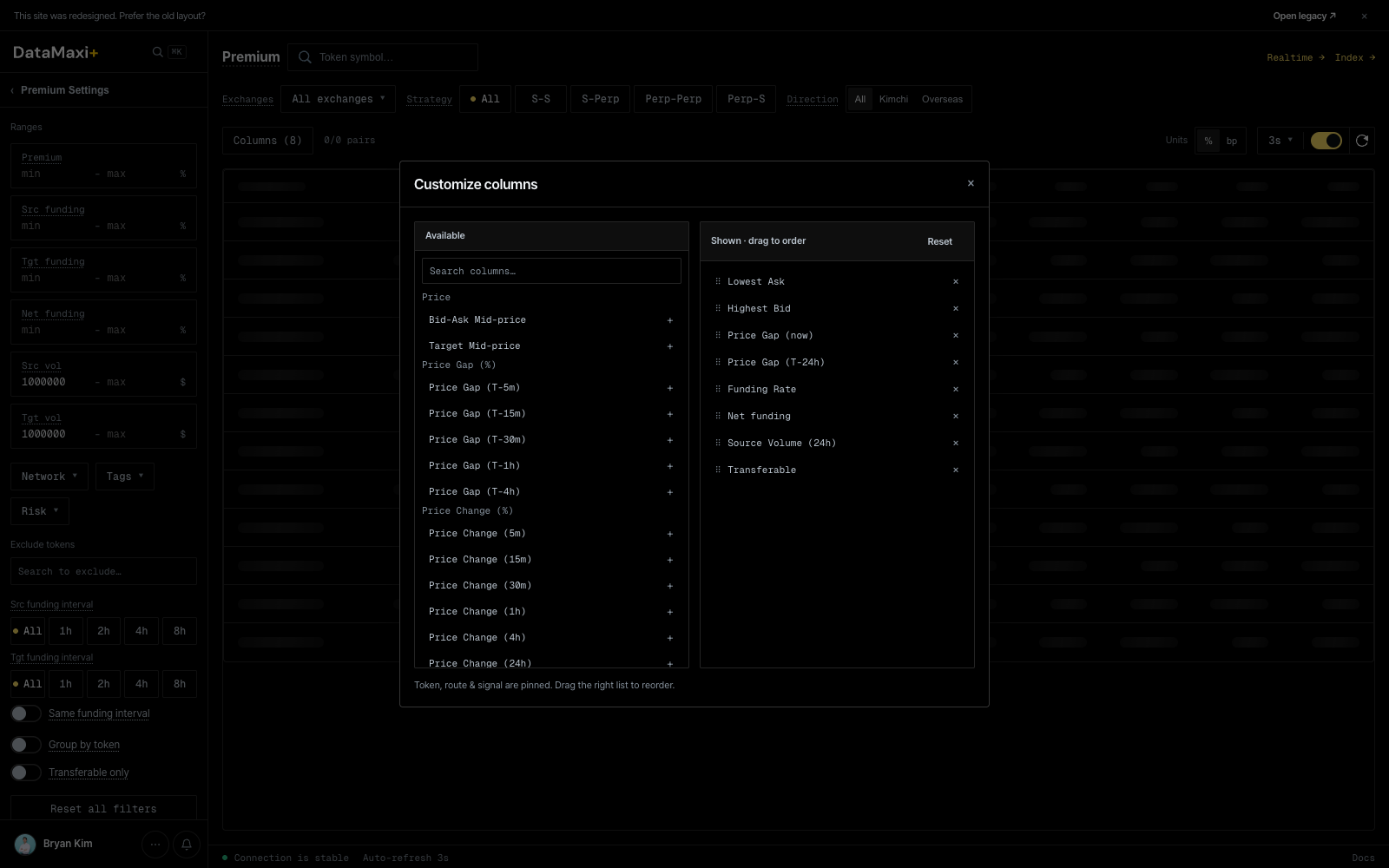
Two panes:
- Available (left) — every column the platform exposes, grouped by header (
Price,Price Gap (%),Price Change (%),Funding,Volume,Risk, …). Search filters the list.+adds the column to Shown. - Shown · drag to order (right) — the columns currently in the table, in order.
×removes; drag a row to reorder.Resetrestores defaults.
The status line at the bottom (Token, route & signal are pinned. Drag the right list to reorder.) confirms that the first three columns are pinned and can't be removed or reordered.
Global search palette
⌘K (macOS) / Ctrl+K (Windows / Linux) opens the global search palette from anywhere on the site — see the platform-wide entry below.
Global search palette
Available on every page via ⌘K / Ctrl+K.
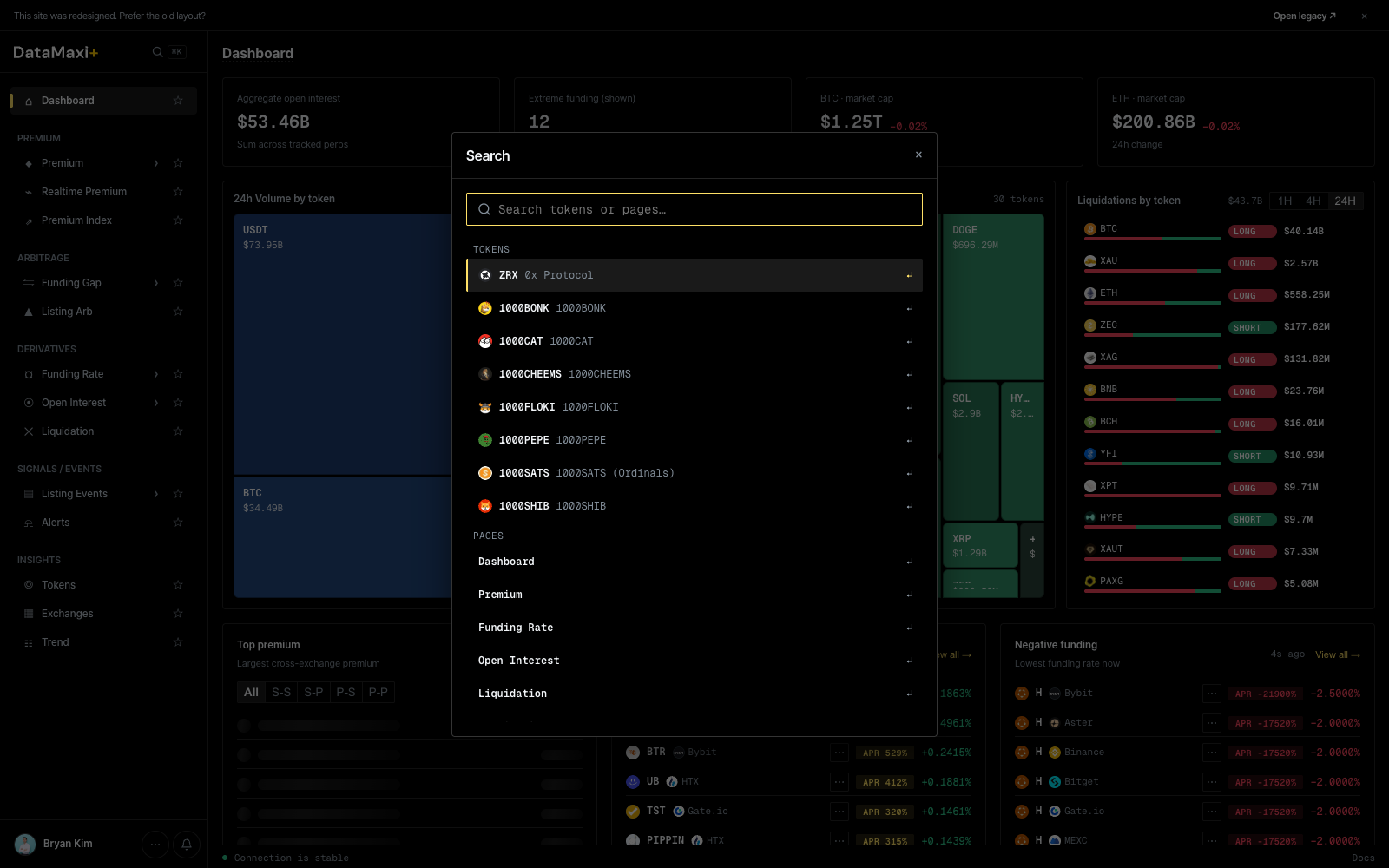
Two sections in the result list:
- TOKENS — fuzzy-matched against the full token catalog. Selecting a token jumps to
/token/<id>(see Tokens → Detail view). - PAGES — quick-jump shortcuts to every left-nav destination (
Dashboard,Premium,Funding Rate,Open Interest,Liquidation, …).
When to use this page
- You hold one of the assets and want to find an executable spread to cycle into the other venue.
- You're hunting Kimchi-direction premium with the KRW filter on.
- You're sanity-checking a strategy: turn
Transferable onlyon, set min volume on both sides, set min premium — what's left is what's actually tradeable right now.